


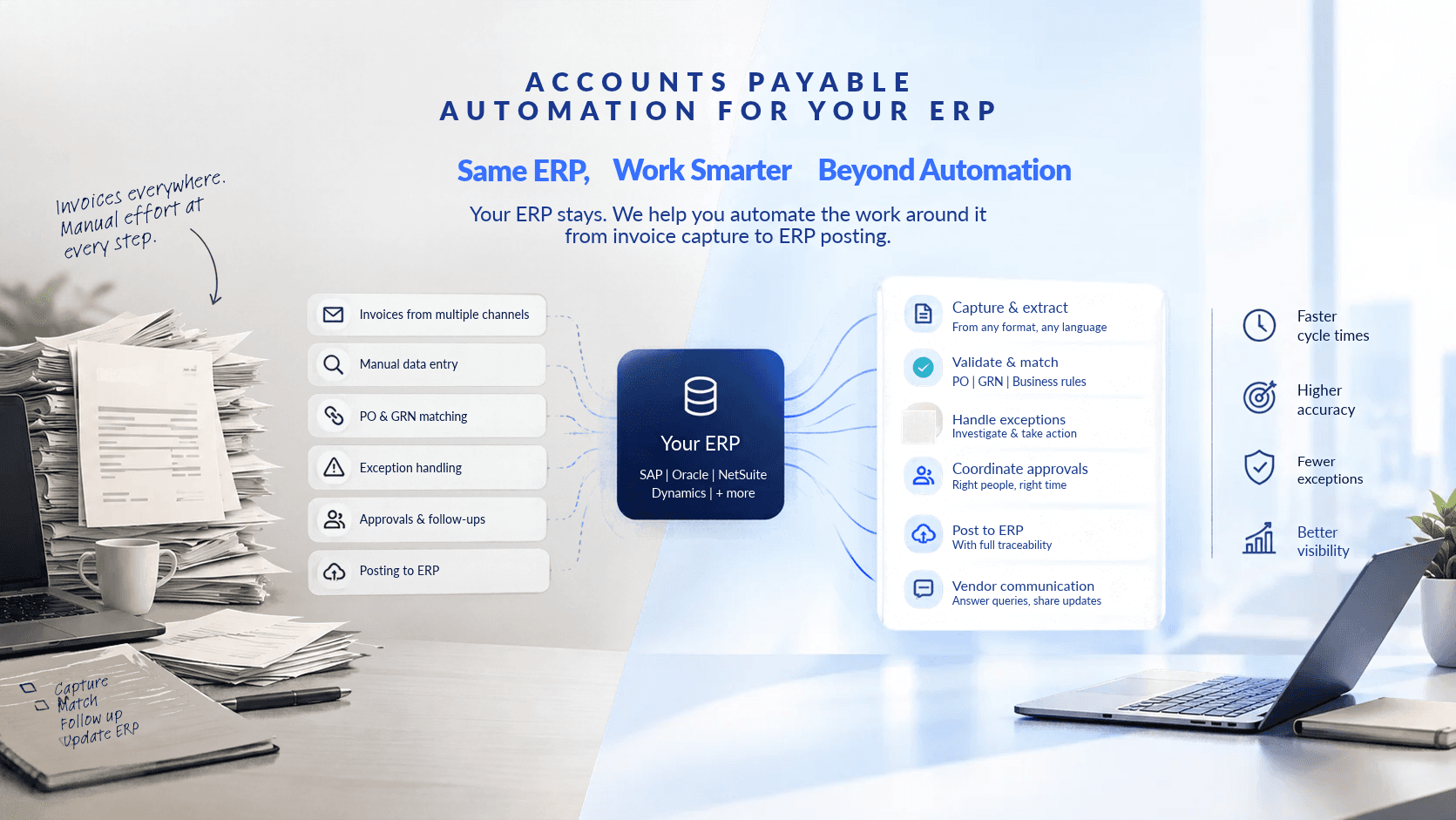
Introduction: Your ERP Already Has Automation. So Why Do You Need More?
Your company already uses an ERP system. It might be SAP, Oracle, NetSuite, or Microsoft Dynamics. It manages your financial records, processes transactions and may already automate several accounts payable activities.
So why would you need another AP automation solution?
It's a fair question.
Most ERP systems offer invoice processing, purchase order matching, approval workflows, and other automation capabilities. But having automation in place doesn't necessarily mean your entire accounts payable process runs without manual intervention.
Invoices can still require investigation. Approvals can get delayed. Employees may spend hours resolving discrepancies, following up with vendors and updating records.
The problem isn't always the absence of automation. Sometimes, it's the work that automation leaves behind.
This is where additional AP automation can help. Instead of replacing your ERP or duplicating its existing capabilities, it can extend automation to activities that still require considerable manual effort.
Let's look at what actually changes, where additional automation makes sense, and how Neil approaches the entire AP workflow.
1. What Does Your ERP Already Automate?
Before considering another AP automation solution, it's important to understand what your existing ERP can already do.
Most established ERP systems offer capabilities that support accounts payable operations.
Depending on your ERP and its configuration, these may include:
- Invoice processing: Capturing invoice information and recording it in the system.
- Purchase order matching: Comparing invoice details against purchase orders and goods receipts.
- Approval workflows: Routing invoices to authorized employees.
- Duplicate detection: Identifying potentially duplicated invoices.
- Financial posting: Recording approved invoices in the appropriate accounts.
- Payment management: Supporting payment scheduling and processing.
These capabilities provide a strong foundation for managing accounts payable.
However, the level of automation varies between systems and implementations. Some businesses have advanced workflows, while others still depend heavily on manual processes.
Even when the ERP handles routine invoice processing, employees may still need to intervene when something doesn't go according to plan.
2. If Your ERP Already Has Automation, Why Do You Need More?
Imagine your company receives 10,000 invoices every month.
Your ERP automatically captures invoice details, matches them against purchase orders, and routes them for approval.
On paper, the process looks automated.
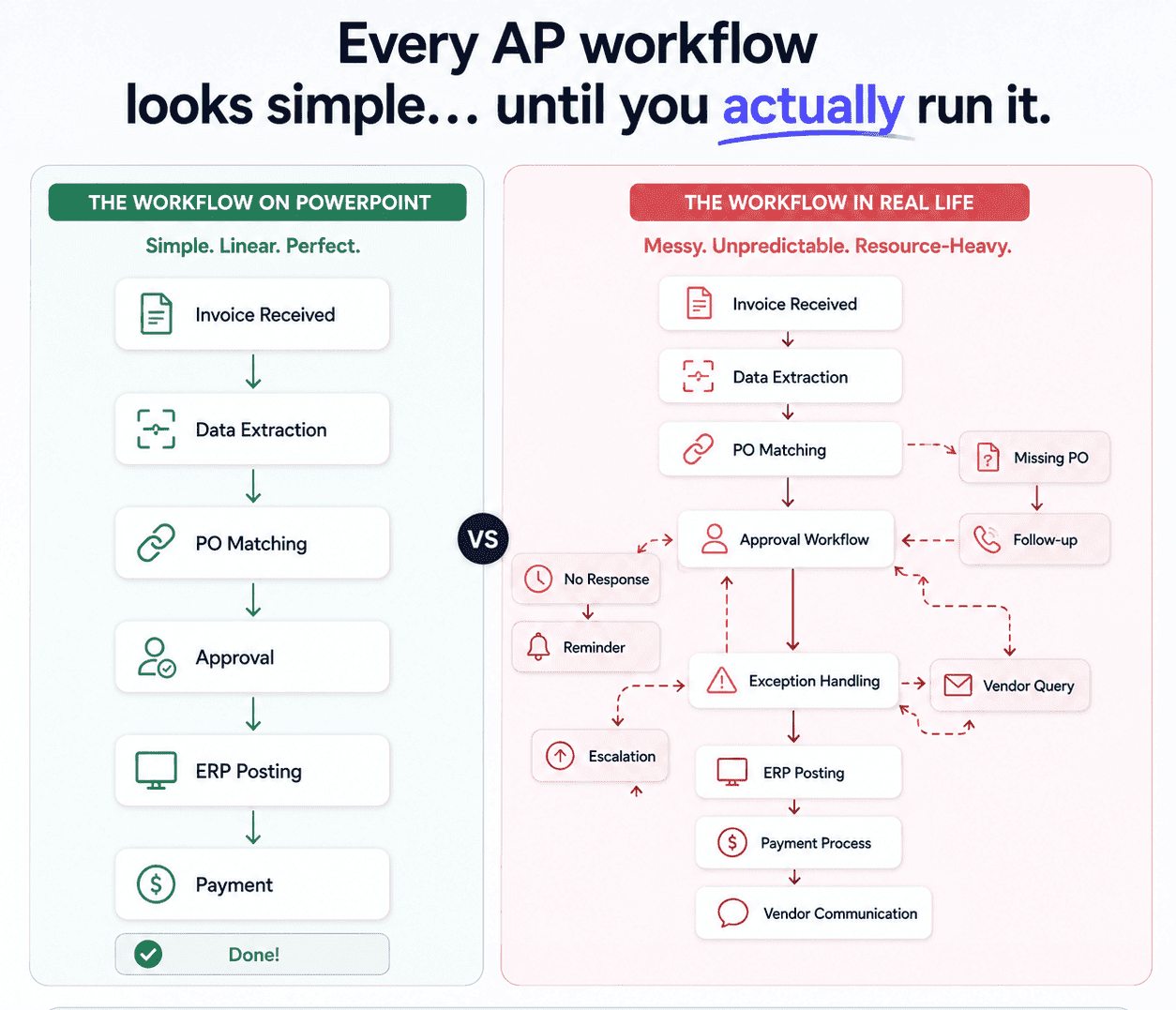
But consider what happens when an invoice doesn't match its purchase order.
An employee may need to:
- Investigate the discrepancy.
- Find the relevant purchase order or goods receipt.
- Contact the purchasing department.
- Follow up with the vendor.
- Update the invoice once the issue is resolved.
Now imagine this happening across hundreds of invoices.
Even though your ERP automates the initial processing, your team may still spend considerable time managing exceptions.
Where existing automation may leave gaps
| AP Activity | What Existing Automation May Do | Where Additional Automation Can Help |
|---|---|---|
| Invoice capture | Extract invoice information | Handle invoices arriving through multiple channels |
| Invoice matching | Compare invoices against purchase orders | Investigate mismatches and retrieve relevant information |
| Exception handling | Flag discrepancies | Investigate issues and take permitted follow-up actions |
| Approval management | Route invoices to approvers | Coordinate follow-ups and manage the next workflow steps |
| Vendor communication | Provide invoice information in some systems | Respond to routine queries and retrieve relevant status information |
| ERP posting | Record approved invoices | Coordinate the preceding steps and ensure required checks are completed |
For businesses with well-established ERP automation, the real opportunity is usually less about processing invoices and more about the exceptions and follow-up work sitting around them.
3. How Does AP Automation Work With Your Existing ERP?
AP automation doesn't necessarily require replacing your ERP or rebuilding your financial processes. An additional automation solution can work alongside your existing system, exchanging information through supported integrations.
Consider a typical invoice processing workflow.
Invoice Collection. Invoices arrive through emails, supplier portals, or other channels. An AP automation solution collects these and brings them into a centralized workflow, reducing the need for employees to manually download and organize documents.
Invoice Data Extraction. The system identifies invoice number, supplier name, date, PO number, tax details, amount, and payment terms. AI-powered solutions can process different invoice formats and layouts without a separate template for every supplier.
Invoice Validation and Matching. The extracted information is checked against relevant ERP records. A three-way match compares the Purchase Order (what was ordered), the Goods Receipt Note (what arrived), and the Supplier Invoice (what's being charged). Mismatches get flagged for investigation.
Exception Handling. Not every invoice follows the expected process. Traditional automation flags issues and waits for an employee to resolve them. More advanced solutions can investigate exceptions, retrieve relevant information, and take permitted actions, routing to a person only when the decision needs human judgment.
Approval Management. Once an invoice passes the necessary checks, it moves through the configured approval workflow based on value, department, vendor, or policy. Employees retain the authority to approve where required.
ERP Posting. After validation and approval, the invoice posts to the ERP, eliminating repetitive data entry where the integration supports it. The ERP remains the system of record.
Payment and Reconciliation. Once posted, the invoice proceeds through your payment process, with automation optionally supporting status tracking and reconciliation depending on the integration.
The precise workflow depends on the ERP, the automation solution, and your financial controls.
4. What Changes and What Stays the Same?
What Stays the Same
What Can Change
Your existing ERP
How invoices are processed before posting
Your financial records
The amount of manual data entry
Your chart of accounts
How exceptions are investigated
Your approval hierarchy
How approval follow-ups are managed
Your financial controls
How repetitive tasks are handled
Your existing ERP investment
How much of the AP workflow can be automated
Your ERP continues to manage financial transactions and records. Additional AP automation handles activities around those transactions, letting you build on your existing ERP investment instead of starting from scratch.
5. How Does AP Automation Work With Different ERPs?
Not every company uses the same ERP, and integration requirements vary significantly.
SAP. Businesses on SAP often already have purchase order, goods receipt, invoice verification, and approval processes in place. Additional automation mainly needs to work with existing SAP data: retrieving POs and GRNs, validating against existing records, supporting the current approval process, and posting cleanly into S/4HANA, ECC, or whichever SAP environment is in use.
Oracle. Oracle environments vary more depending on which products and modules are implemented. Integration needs to account for existing invoice validation, approval, and posting requirements, including access to supplier and PO data and secure posting back into the system.
NetSuite. NetSuite's financial management capabilities already support core AP operations. Additional automation should be evaluated on how well it retrieves transaction and vendor data, matches against POs and receipts, and fits existing approval requirements without disrupting accurate record-keeping.
Microsoft Dynamics. Dynamics environments vary significantly by configuration, so any automation layer needs to be evaluated against your specific setup, covering invoice data exchange, PO matching, approvals, and posting.
Multiple ERPs. Some organizations run different systems across business units or regions, for example SAP in one and NetSuite in another. This creates real inconsistency in processing, approvals, and reporting. An automation layer can help coordinate across these systems and provide one consistent process, as long as the integration genuinely supports each environment rather than just the primary one.
The real question isn't simply whether a solution supports your ERP on paper. It's whether it works with your actual processes without adding a new layer of complexity on top.
6. From Task Automation to Workflow Ownership
This is what's usually called agentic AI: software that doesn't just flag a problem and wait, it investigates and takes the next step itself. Here's what that actually looks like in an AP workflow it already knows. (link "agentic AI" to the "Agentic AI vs. Human Accuracy" post)
Automating individual AP activities is useful, but managing the entire workflow requires more.
Consider an invoice with a purchase order mismatch. Conventional automation identifies the discrepancy and flags it. An employee then investigates, retrieves the relevant documents, contacts the right department, and updates the invoice.
A system built for workflow ownership handles more of that itself. It identifies the discrepancy, retrieves relevant information, investigates the issue, and takes permitted actions to move the invoice forward, involving a person only when the issue genuinely requires judgment.
Traditional Automation vs. Neil
Traditional Automation
Neil
Automates predefined tasks
Takes ownership of connected workflow steps
Extracts invoice information
Extracts and uses invoice information to drive the workflow
Flags exceptions
Can investigate exceptions and take permitted actions
Routes invoices for approval
Coordinates the workflow around approvals
Often relies on predefined paths
Can manage different scenarios within configured boundaries
Requires manual intervention for many exceptions
Can resolve certain exceptions without routine manual intervention
How Neil Approaches AP Automation
Neil, the AI Co-Worker® for Accounts Payable Transformation by e42.ai, is designed to manage the AP workflow from invoice intake to ERP posting. Rather than focusing only on extraction or individual tasks, Neil coordinates multiple activities across the workflow: capturing invoices from different channels, extracting information across formats and languages, validating against POs, GRNs, and business policies, investigating discrepancies, coordinating approvals and follow-ups, posting to the ERP, and supporting vendor communication and status queries.
When an issue requires human judgment or authorization, Neil involves the appropriate employee.
7. How Long Does ERP AP Automation Take to Implement?
Implementation time depends on your ERP and its configuration, the complexity of existing AP workflows, the number of entities involved, integration requirements, approval rules, and how much is included in the initial rollout.
Neil's stated implementation timeline is 6–8 weeks, though the actual duration depends on the customer's environment and project requirements. The objective is to integrate with your existing financial environment while minimizing disruption to ongoing operations.
Before starting, establish a clear scope, define integration requirements, and agree on measurable outcomes.
8. Is This Worth Evaluating for Your Business?
Worth a closer look if any of this sounds familiar: your team still spends real time on manual exception handling despite having automated capture and matching, invoice volumes are climbing faster than your process can absorb, AP spans multiple systems that don't talk to each other, exceptions routinely take too long to resolve, or getting a straight answer on an invoice's status means checking several systems or calling around.
If none of that applies and your current setup already gives your team the visibility and speed it needs, additional software may not add much. The decision should come from the actual gaps in your process, not just the availability of new technology.
9. What Should You Ask Before Choosing an AP Automation Solution?
Does it work with our existing ERP? Understand how the solution connects, retrieves information, and posts approved invoices.
Does it duplicate automation we already have? Identify which activities your ERP already automates and which still require manual intervention.
How does it handle exceptions? Ask whether the solution simply flags discrepancies or can investigate them and take permitted actions.
Can it support our existing approval rules and financial controls? Confirm it works within your authorization requirements and maintains proper audit trails. This is also where it's worth asking about security certifications directly (ISO 27001, SOC 2, GDPR), especially if IT or security has a seat in the evaluation.
Can it scale across multiple entities and ERP systems? If you operate across regions or multiple ERPs, understand how the solution supports those environments.
Conclusion: Get More From the ERP You Already Have
Your ERP is an essential part of your financial operations. It manages your financial records, supports invoice processing, and may already automate many accounts payable activities.
But automation doesn't always eliminate the manual work involved in managing exceptions, coordinating approvals, and communicating with vendors.
For businesses experiencing these challenges, additional AP automation can extend existing capabilities without replacing the ERP. Neil takes this further by focusing on workflow ownership: managing connected AP activities, investigating exceptions, and taking permitted actions, while keeping people involved where their judgment and authorization are required.
The objective isn't to add another system just for the sake of automation. It's to reduce the manual work that your existing automation still leaves behind.
Ready to explore what's possible with your existing ERP?
Talk to Us About Your ERP Setup